The impact of coronavirus lockdown on the restoration of the Environment and Global Warming issue a step toward the “Ecosystem Restoration” which is the theme of World Environment Day 20121.
These Environmental issues include a wide range of pollutants, including ozone, water, industry, noise pollution, increase day by day and in this race man versus wildlife conflict is also considered. But it has been noticed and observed globally that during this lockdown period our environment diversity including flora and fauna get restored better than the previous one. Watch this video for better understanding
Coronavirus: Good for the environment
It has been accepted that this coronavirus Lockdown influence to revive the status of our mother earth and it is not worng to say that this coronavirus act as environmental vaccination to cope up with these global anthropogenic activities and human wildlife conflict, since years back with Zero restoration after spending billions dollar economy on the conservation and management of environment and forests.
But it was noticed and observed that how this Coronavirus Lockdown and previous one also shows postive impact on various environmental parameters, and which was not seen in any scientific studies till now. This lockdown restoration process is a hot topic of research and discussion globally that helps to find the solution of Earth ecosystem degradation which will be for the wellbeing of our mother earth.
Coronavirus Lockdown Supports the Environment To Bounce Back, Stay Safe and Save The Mother Earth
Watch this video analysis to see the postive lockdown impact on this planet
Positive Impact of Coronavirus Lockdown
“Although the human develops coronavirus vaccine, however this coronavirus itself is an environmental vaccine and we humans are viruses”
There is a chance that once the lockdown period has passed the environment pollution levels may return at a faster rate so the human effort to save the environment can have a lasting impact.
Thus, we can conclude that if we make the weather deterioration or worse than Mother Nature is trying to bounce back, and we should understand what the global climate can expect.
This is all about this article and hopes these analyses open the shutter of your mind and you can think about the health and wealth of Our Planet Mother Earth, KRS is an academic cum research platform, which help you in your carrier advancement by brings new articles from time to time, stay connected.
If this is your first time here on this blog helping you grow your academic and research carrier please share and subscribe to our website, so that it can reach all people in need, and for more E-content, for research support, you can find it on our website or you can also write us at info@kressup.com for a free consultation
My Suggestion:An annual 2-3 weeks lockdown, which not only improves the Global Environment Status but also saves Billions of Dollars Economy which is used every year to protect this Global Environment Prestige.
Online research promotion is an effective and efficient way of author interaction and communication with other researchers and readers by providing them with a summary of his/her key findings or research work outcomes in the form of a research paper, articles, etc.
Research promotion is also entitled as a systematic way to increase the impact of quality research in higher education institutions by obtaining information from other authors and with the support of new tools and technologies in existing research and by improving the research skills.
Research and extension activities, such as writing a research paper, articles, and running projects, are an important part of academic teaching in any university and are used for the promotion of academic excellence.
The research promotion is a dynamic process of growth and development of that institute and these online promotion of all published research work with an updated advertising are used for gaining this popularity.
To achieve the highest quality in research, an author needs to publish his/her research works in a reputed journal with a great impact which is used for promotion.
So each author can choose top research promotion source for their research, so that a novel piece of research results can be seen by other workers globally.
As researchers, you are making great progress in developing valuable knowledge by doing good research, but sharing your research by using research promotion tools with a wider audience can make you more visible in your field. This greater visibility will enhance your reputation and impact in your research, which is important for the improvement of the education system, research process, and innovation of institutions.
What is the prime need for research promotion?
We know that researchers are working in a competitive market and that each researcher are often asked to prove how his/her research has going on and hence these researcher need research promotion …..
To improve your ranking among other authors, get recognition and exposure.
To gain self-promotion and making a name in scientific community.
To increase research impact by achieving a maximum number of citations for his/her work from other work which determine the author platform.
To gain identity by sharing academics and researchers’ engagement with your peers and the education community as a whole.
To gain engagement with the audience government, service delivery, industry experts, policymakers for the betterment of the society.
Next, this promotion of published work will help you to get encouragement and increase the citation level of your research work. To help you get starting research promotion, here is the list of some top-level professional networks and you can promote your latest research article, research papers, project activities, and intensify the expert collaboration with the help of these network sites that help other researchers share and improve your academic reach.
How to use online sources for research promotion
Many online resources or leading advertising platforms for a particular field are interested in promoting your research work that does not fall into these specific areas.
Below are some online promotion network mentioned and how to use suggestions, you should consider to promote your research work, thesis, and published papers.
1. LinkedIn
LinkedIn is an American business and employment-focused service that operates through websites and mobile applications. This online platform was launched on May 5, 2003. It is mainly used for network communication, research promotion, and business networking.
LinkedIn profile will summarize your professional experience in your connections, current and future plans, and employers. With this updated profile, you can show off your professional life, movements, skills, and interests and used this platform for online research promotion,
You can create an account and complete your profile. Upgrade your organization profile and make a different connection with others, Promote your research by joining LinkedIn groups and expert panels, sharing key findings by copy-pasting the research on the LinkedIn writing section, republishing it, and finding attractive content to upgrade your research.
2. Academia
Academia.edu is an American-based educational communication website for professional development. It started as a free and open-source textbook and was launched in September 2000.
This platform is for academic research, scholars who have uploaded more than 22 million papers, and almost 31 million scholars, professionals, and students read the papers each month.
Academia provides free access to everyone’s research and offers pays premium power to subscribers and gives researchers access to advanced discovery tools and provides authors with advanced analytics tools and impact tracking tools.
Academia is one of the top networks to share research papers with millions of people around the world. A study published in PLOS ONE found that papers uploaded in Academia received a 69% citation over five years.
How to use
You can use Google scholar to create your own basic profile and manage your public profile to share papers, lectures, conferences, presentations, etc. Connect with other professionals to create posts, send messages, and read their uploaded research articles. Identify specific research interests, browse, download, and save documents related to your topic.
3. Epiloge
Epiloge is a community of students and professionals founded in 2019 in Germany, to connect, write, and be open to creating opportunities, showcasing research papers, scholarly articles, projects, and ideas.
The concept of Epiloge comes from experience working on various projects, presentations, and papers as students and later in our activities. No matter how much effort you put into something, there was no platform designed to display work done as a team in multimedia format.
That is why we have created a platform for people to upload, write or share and used for research promotion what they do in their fields and communicate with others in that way. The things we research, develop or write about, in our view, are the best way to show who we are.
How to use
To create an appropriate profile in your field of interest, Epiloge had no intention of blocking the types of topics or projects. You could freely download scientific or historical papers from a single account.
The epiloge can add value to people’s lives and build a user forum for communication, following projects with interested users, finding projects and articles at universities, colleges, or other company profiles, and learning about new ideas.
4. Google Scholar
Google Scholar is an easily accessible web search engine that identifies complete text or scholarly writings for a wide range of publishing fields and guidelines.
Google Scholar offers an easy way to extensively search for scholarly documents and research promotion. From one location, you can search for a wide range of fields and sources, essays, suggestions, books, summaries, and court opinions, from academic publishers, technology communities, online repositories, universities, and other websites. Google Scholar helps you find a suitable job worldwide for academic research.
You can use Google expert using a simple three-step process, create your google scholar account and own basic profile by login into scientist.google.com and click the “My Profile” link at the top of the page to start setting up your account, add your published research work, projects and make your profile public.
5. Medium
Medium is a place to read articles online and research promotion which is why it is the best place to exchange your research, share it, and distribute it. In the midst of medium is an open platform where 170 million students come to experience creative and powerful thinking. It is a place open to everyone but it enhances the object and the authenticity and it is where deep communication between students and writers can lead to discovery and growth in scientific values.
Our aim is to spread these ideas and deepen our understanding of the world. Together with millions of partners, we are building a trustworthy and dynamic lifestyle that is motivated by important ideas and people who think about them and wish to share their thoughts, idea and research work for the nobility of other and get a name and fame
How to use
You can create an account in less than a minute by going to Medium.com and clicking the “Get Started” button in the middle of the page or the “Sign In/Sign Up” link at the top of the page. From there you will have four subscription options to choose from: Twitter, Facebook, Google, and email. You can add your article by copying and pasting it into the creative story section or providing a link, republishing it, and sharing it on other social media platforms.
6. ResearchGate
ResearchGate is a European social networking site for scientists and researchers for research promotion, to share papers, ask and answer questions, and find collaborators and measure your impact. Get in-depth statistics on who has read your work and follow your quotes, cite your work, etc.
ResearchGate is a technology network for scientists and researchers. More than 20 million members from around the world use it to share, discover, and discuss research. Our mission is to connect the world of science and to make research accessible to all.
This also helps you connect with your scientific community, share your research, collaborate with your peers, and get the support you need to improve your career, gain scientific knowledge and stay connected to the world of science
ResearchGate identifies published information in user profiles to encourage members to connect with others with similar interests. When a member submits a query, it includes others who have indicated in their user profile that they have the appropriate expertise.
How to use
Join ResearchGate for free by creating an account at www.researchgate.net. or connect with Facebook or LinkedIn, upload your published research papers, book chapter, conference paper, and other document and view your profile for RG points and citation
7. SlideShare
SlideShare is an American hosting service, founded in 2008 and now owned by Scribd, with professional content-proven research promotion and an online sharing service that allows you to upload and share your PowerPoint slideshows, other types of presentations, infographics, or videos.
Users can upload his/her files privately or publicly in PowerPoint, Word, PDF, or OpenDocument format. More than 80 million experts expect SlideShare to learn about any topic as soon as possible from story experts.
The slide has since become the top source for professional content. With over 18 million downloads in 40 content categories, today it is one of the 100 most visited websites in the world.
SlideShare has millions of professional users, and the site has many monthly visitors and any uploaded presentation or document shared on SlideShare can be seen by a large number of viewers. This makes it a great tool to share your business message and create traffic to your website.
How to use
Go to SlideShare type at URL: slideshare.net and click the signup button and use LinkedIn to create an account, if you do not have a LinkedIn account, click the login link and set up your new SlideShare account. You should see your profile picture in the top right corner of the SlideShare screen next to the upload button and your account is ready to share your first slideshow online. Upload existing presentations to SlideShare and share your own research work, etc.
8. Use Your Email Signature
It can be quite an effective way of research promotion and leading advertising platform, but adding a link of your work in your Gmail signature and by doing this, you make sure your contacts are up to date with your latest research and findings. This is an easy way to help your contacts find your work.
How to use
An email signature is a text block that appears automatically at the end of an email message. It is used to provide recipients with your contact information such as your name, job title, phone number, and email address, etc. You can also click on Gmail settings and in the “Signature” section, add a link to your search which helps to share your connection with others.
This is all about this article and I hope these networks help you in the promotion of your published research work so you can achieve your academic goal and get success in life
KRS is an academic cum research platform, which helps you in your career advancement by bringing new articles from time to time. Stay connected.
If this is your first time here on this blog helping you grow your academic and research carrier please share and subscribe to our website, so that it can reach all people in need, and for more E-content, for research support, you can find it on our website or you can also write us at info@kressup.com for a free consultation.
If you find this article usefull, share with other
Related articles:
General FAQ Related to Research Promotion
Q 1 .What is research promotion?
Research promotion in an effective and efficient way to communicate the findings of your research quickly and easily by proving a summary of your research work to a wider audience.
Q 2.What is a promotion network?
It is an online sources or website used by scientists, researchers, and businessmen to share papers, ask and answer questions, and find participants etc.
Q 3. Why you need promotional networks
This is one place where your work will definitely discover by collaborators and investigators who would like to quote your work to find others and share their work.
Q 4. How to use this promotional network for research
Create your profile on any network and upload your publications, research paper, and notified when people contact you, request for quote your paper, and cite others publish papers you may interested in.
Q 4.How do you promote your research?
You can promote your research by publishing in Reputed and index Journal and after publishing advertise of leading advertising platform like social sharing, media streaming, blogging, email marketing, and personal content etc.
The simple answer is that it’s the world’s largest online professional network launched on 5 May 2003, United States, helping people find jobs, share opportunities every day, and managing career is the one reason to join LinkedIn.
LinkedIn is a social networking site designed for education, businesses, and professionally working individuals to exchange ideas and opportunities.
You can create your own profile account for free and connect with people globally. Contact someone who can endorse their skills.
Different companies can also create their own profiles to advertise and post job openings for new employees, for which each and every individual user can post their CVs and apply.
As you grow your professional profile on LinkedIn, you can establish a resourceful authority for your knowledge and skills that allows people to find you when they search the Internet.
How to create an account and register in LinkedIn
You can create your account for free and register yourself by following a few steps.
Step 2. Click on sign up link and enter your email or phone number on the box give, set a strong password click on agree and join button
You can join Google
Step 3. Next, add your full name and click on continue, fill Security verification code you received on your email or phone number you used to create an account, and click on submit, your account is almost created
Your Linkedin account is almost created with a welcome message on your dashboard and now its time to set your profile
Step 4. Next, add your city/district name, “click next” and add your recent job title, employment type, most recent company, etc., or you can go with “I am a student,” “click continue.”
Step 5. Add a few connections (recommended) with people you wish to reach or skip this point,
Step 6. Add profile photo for eye-catching response or you can skip this point or import from Facebook or Gmail account
Step7. Following a few people or company to stay updated on the kinds of stuff you needed and click Finish
Step 8. Finally, your account created and you can enjoy LinkedIn help and support
The LinkedIn network starts with your profile so spend a little time creating an eye-catching profile, which shows the best and displays that you are an experienced professional. You can add information about yourself, your business, or a product that helps people discover your skills and efficiency.
How LinkedIn helps us
In a few seconds after creating an account, you’ll be up and people find you on LinkedIn. You’ll have more control over what appears in Google results, and having a robust profile encourages people to approach you with opportunities.
Most of your contacts are already on LinkedIn, and you can reconnect by uploading your address book. This allows you to stay in touch as your contacts change jobs and email addresses. Your reputation is summed up in a relationship that has improved with your career.
It helps you maintain these relationships, and you want to make new professional connections with others, so you can find people using LinkedIn’s search tool and see who you know in common.
You can also join a LinkedIn group, where professionals in your field discuss and solve problems related to your industry. Link to your Twitter account to share tweets with your professional network both from LinkedIn to Twitter, and vice versa. You can also download the LinkedIn mobile application and use this app to stay connected with your network wherever you are.
These features help you, whether you work in the office or on a trip, LinkedIn keeps you in touch with people who are important to your work, and since registration in LinkedIn is free and connected with LinkedIn may be the best venture you can make in your career.
Silent feature of LinkedIn network
There are a few key features and working strategies of this online network.
First is that you can put your work experience on your profile so potential employers can see it. Your profile is like an online version of your resume. This can help you gain exposure to more potential employers.
The second feature is that LinkedIn allows companies to make profiles as well, so they can show themselves off, connect with potential partners, and even hire new employees.
The third feature is that it can help you establish and expand your professional network. You can connect with people you know personally or professionally. They may be able to point you towards a job that suits you and you can help them out.
The fourth feature is that it can help you show off your skills and credentials. Your LinkedIn connections can endorse the skills you list on your profile, and you can do the same for them. This is a way to show potential employers that you have people to vouch for your abilities.
The fifth feature is that companies can post job listings on LinkedIn and you can apply for these jobs on the site as well. Or if you’re running a business yourself, you can post job advertisements or vacancies to find new employees.
The sixth feature is that it will help you get job advice from other people in your field of work. You can join different groups of people with similar jobs or skills and discuss professional matters that relate to your work. You might even gain knowledge and advice that will help you take your career to the next level.
The seventh feature that anyone can talk to you about is getting the latest business news. You can keep up-to-date with workforce and business news on LinkedIn from your contacts or directly from LinkedIn.
This is all about LinkedIn and its working process. We hope this information and guidelines help you create an account on this platform, achieve your academic goal, and achieve success in life.
KRS is an academic cum research platform, which help you in your carrier advancement by brings new articles from time to time, stay connected.
If this is your first time here on this blog, this blog helps you grow your academic or research career. Please share and subscribe to our website, so that it can reach all people in need.
For more E-content, for research support, you can find it on our website, or you can also write us at info@kressup.com for a free consultation.
Dont fort to shar of you find this articel usefull
Related Articles:
General FAQ Related to the LinkedIn Platform
Q 1. What is the main purpose of LinkedIn?
It is a social network to connect with different experts to maintain an educational cum professional relationship with the world’s top professionals, educationists to mark them more useful and popular.
Q 2. Role of LinkedIn in professional growth
It can help you establish and expand the professional network you can connect with people you know and join different pages, groups that provide you excellent links and increase awareness of your invention and allow you to share articles, discuss professional matters that relate to your work you might even gain knowledge and advice that will help you take your career to the next level.
Q 3. How can we use LinkedIn for educational purpose
It gives online access to students and helps you maintain an educational relationship with top specialists, teacher, and peers which can enhance the performance of your Learning and encourage students to improve their working presence through e-learning and make new academic connections with other.
Q 4. Important of LinkedIn profile for college students
College students can use linkedin to establish his/her educational and professional network which improves the online existence of these students in their education community which is important for finding works, jobs, internships, and other opportunities during schooling.
If you are a researcher and going to write a research article, then it would be best for you to have an understanding of the reference management software and citation tools available to you online
I noticed that if you are not familiar with these online tools, then it will be quite a difficult and time-consuming task to write or handle citations as well as references in your document individually
It is our intention in this article to discuss the top 25 reference managing software and citation tools available for your research. We hope that after reading this article you will become familiar with these tools and be able to use them effectively during your research.
If you encounter any difficulties with your scientific writing or research, please do not hesitate to contact us by email
Reference managing software and citation tools are the online sources that help you build a reference list or bibliography at the end of your research paper, thesis, or any document.
Suppose you are writing an essay or a thesis and you have a lot of different references in your bibliography, but you are not sure how to format it and the manual referencing format style you wish to add to your research paper or thesis is a very tedious and time-consuming practice.
These reference managing software or tools allow researchers to communicate and articulate the citation work specified in their papers and also known as citation management tools, software that can create relevant citation style you want to add in your documents and research paper, etc. (e.g. MLA, APA, etc.).
Additionally, Reference managing software can automatically creating bibliographies, or footnotes, or reference sections in research papers and can edit personal libraries, or manage access to an external reference source from any web sources and literature database.
The following tools and online software can help you in managing your reference resources and organize citations according to any format you wish to follow.
List of 25 Best Free Reference Managing Software and Citation Tools
1. BibDesk
BibDesk was developing as an open-source reference managing software and is for macOS users to manage bibliography and references when writing an essay, articles, and thesis.
It can be used to organize and maintain a library in PDF and another format to organize and manage your bibliography. It will track your bibliography and related files or web links for you and will make it easier to use your bibliography in other applications and are especially suitable for LATEX users.
2. BibSonomy
BibSonomy is a free browser plugin and reference managing software supported by the collaboration of university researchers for research purposes and provides the BibSonomy database in the form of dumping SQL for those who are interested and need to register before accessing this database.
It is also used for public bookmarks and publishing sharing programs to integrate features of bookmarking programs and team-oriented publications management
3. Citationsy
Citationsy is an excellent tool and Reference managing software that helps in the collection of bibliography and creates a list of those people who value simplicity, privacy, and speed. Citationsy lives in the clouds and is accessible from and we do not sell or provide your personal information to anyone so don’t worry about data loss. Your data is store in the cloud and backed up every 10 minutes.
This tool is accessible to your iPhone, android apps and you can also add chrome and firefox extensions to the cited website.
4. Citavi
Citavi can be freely downloaded from the website and is a program for reference management in Microsoft Windows published by the Swiss Academic Software in Wädenswil, Switzerland.
It includes the management of the bibliography and establishes 35 reference types for common sources such as books, articles, lectures, audio or video documents, etc. by using online searches on thousands of archived resources from database around the world, creates an outline, analyzes texts, store quotes, and ideas, creates a draft and writes reports, articles, or letters faster than you thought possible. Citavi is accessible and add-ons for Mozilla Firefox, Internet browsers, Internet Explorer, and Google Chrome
5. Cite This for Me
Cite This For Me is one of the most popular citation tools with the aim of helping students creating p[efrect referencing list in less time. Cite This For Me has helped millions of users around the world including the United Kingdom, the United States, Australia, and more. In addition to the reasons mentioned above, quoting sources in education provides evidence of your research process and helps you to avoid plagiarism.
In Cite This For Me, you can choose from a list of 30+ sources and cite from a website, a book, a video, an online photo, or something completely different source.
6. Cite4me.org
Cite4me.org is a free automatic Reference managing software and creator reference that supports MLA, APA, Harvard, ACS, ASA, APSA, Bluebook, IEEE, Chicago format and manage, bibliography, add Plagiarism Checker.
Cite4Me.org started as a student project on Information and the website attracted students and teachers who use this service to find a classroom environment and committed to maintaining the core functionality of Cite4Me.org for free.
7. Citeshare
Citeshare is one of the fastest citation tools for web articles and works with the goal of helping students with the completed assignment and you can use with chrome extension only supports APA or MLA style of referencing. But you should upload an online article to your browser and mention it by clicking on the extension. The chrome extension designed to identify and share reference articles.
For example, you can use an extension when you want to share a rating from an online article. It is not a nuisance to non-academics who want to quote it.
8. EasyBib.com
EasyBib is an online tool used for citation and referencing in research that is easy to use and informative. EasyBib is not only accurate, fast, and comprehensive, but it helps teachers to teach and students learn how to be successful and become systematic researchers.
EasyBib offers a different version of the referencing style like MLA, APA, Chicago and most of these styles powered by CSL and Citation Styles Language from CitationStyles.org, licensed under the CC-BY-SA license.
9. EndNote
EndNote is a commercial software package used as Reference managing software, bibliographies, and citation tools when writing essays, reports, and articles. In spite of paid version, there is also a free online version of EndNote available. It is currently developed by the Clarivate Analytics Software program which is available at a discount to purchase for faculty, staff, and students of Wayne State University.
It used to store and edit citation information with word processor software such as Microsoft Word, Apple Pages, OpenOffice, Mathematics, and more, to create and manage bibliographies in your favorite style when writing research papers.
9. EndNote
F1000Workspace is a platform to assist biological and medical researchers in finding and compiling literature, managing indexes, and editing manuscripts, applications, posters, lectures, etc. It is a web-based application, a browser extension, and a powerful Microsoft Word plugin, and a lightweight desktop application for importing reference from different Reference managing software or tools like EndNote, RefWorks, Mendeley, Zotero, Papers, etc. or from PDFs from your computer
A Microsoft Word plugin of F1000Workspace allows you easily add a citation, search new references and get smart citation recommendations and manage indexes easily import your existing reference and compile new ones using the F1000 browser button.
11. Formatically
Use citation can be tedious work, but formatically is an online quick reference managing software or citation manager tools and based on advanced technology and provide two gears, first is to introduce a good interface and make the whole process faster and has a manual citation wizard, but if you try to finish the paper in a hurry, you will choose the default automatic tool.
It states that it can help you build your entire list of references in less than 11 seconds and supports different styles like MLA, APA, Chicago, Harvard book quotes, websites, audio, video, works of art, dictionary entries, and more. This umbrella with the full range of content you find online is a key benefit for Instant Citation Manager.
12. JabRef
JabRef is an open-source citation platform and free Reference managing software. It uses BibTeX and BibLaTeX as its traditional formats and is thus used for LaTeX.
It is an excellent BibTeX file editor that allows you to perform several actions when dealing with such data, retrieve and link full-text articles, download complete bibliographic details based on ISBN, DOI, PubMed-ID, and arXiv-ID, Import new reference from the web browser with a single click using the official browser extension
13. Mendeley
Mendeley is a free reference manager that can help you save, organize, monitor, share and cite references and research data.
Mendeley is a tool provided by London, UK based company for academic research and services.
It is best known for its reference manager used to manage and share research papers and automatically produce bibliographies of scholarly articles and easily share with other researchers online, Import papers easily from other research software and find relevant papers based on what you read, Mendeley can easily access your pages from anywhere from online sources and can be used as plugins for Word, LibreOffice, and BibTeX and cover thousands of citation styles you c wish to create for your document.
14. MyBib
MyBib is a free bibliography and citation generator that makes accurate citations for you to copy directly into your assignments, thesis, and research papers. It helps to automatically create bibliographies, references, and citations in APA, MLA, Chicago, Harvard, and more style.
15. Paperpile
Paperpile is an online Reference managing software used for referencing and used as an add-on extension in Google chrome, which the combination of storage like Google Docs and web search engine like Google Scholar.
It was launched in 2012 by three computer scientists (Stefan, Greg, and Andreas) with the purpose to facilitate the flow of work in collecting, managing, and writing research papers.
16. Qiqqa
Qiqqa is a free Reference managing software that allows researchers to work with thousands of PDFs and integrates PDF index management tools, a citation manager, and a mind mapping tool.
Using Qiqqa you can create bibliographies and format references from different sources within Microsoft Word by interacting with your Qiqqa library and working on your document, Qiqqa will automatically recommend a reference from your library that you would like to mention within your worksheet on your Windows tablet, laptop, and netbook.
17. ReadCube Papers
ReadCube papers is an award-winning Reference managing software, that will improve online access, to edit, read, cite and share academic research.
ReadCube papers software developed with the aim of making the research world more accessible and connected to serving researchers, publishers, educational and commercial organizations.
ReadCube Papers, any access and publishers services and are currently available as a web-based platform (Web App) and for iOS, Android mobile applications and a real free desktop app were available.
ReadCube Papers is a powerful source of citation management and detection tools that can greatly improve the way researchers find, access, organize, read, explain, share, and cite the research records.
18. Refbase
Refbase is an institutional software source and Reference managing software commonly used for archiving and importing, exporting data in a variety of ways including BibTeX, Endnote, RIS, PubMed, ISI WoS, Refwork, CSA Illumina, MODS XML, MS Word, and OpenOffice.
It can create a formatted list of quotes in HTML, RTF, PDF, or LaTeX, and provide a powerful search as well as RSS support. Its OpenSearch and SRU/W web services, and unAPI &COinS metadata support allow easy access by customers and search engines.
19. RefWorks
RefWorks is an online referencing and citation manager tool that allows you to build your own database by importing references from different text files or from any online sources.
You can use these guides to write papers and automatically format the paper and add a bibliography in seconds. RefWorks is a software-based trading management software package developed by Ex Libris, a ProQuest company and founded in 2001 by Cambridge Scientific Abstracts from 2002 until acquired by ProQuest in 2008
20. Sciwheel
Sciwheel is an online reference managing software and freely accessible to students, faculty, and staff, etc. or for someone else who is interested in other book management software programs that are open to accessing and storing references directly from the web, including Google Scholar and PubMed and an accurate way to access, read, explain, write and share high-tech intelligence to easily save and arrange reference with powerful browser extension form a web link, complete writing data, and PDF, etc.
You can import references from textual information using Sciwheel and use the Word plugin to enable certain style quotes in your text.
21. Sorc’d
Sorc’d is more than a citation generator and reference managing software it also helps to manage data by saving, editing, remembering, and sharing important pieces of information. It features an award-winning program that adds captions to relevant content you found online with a single click and provides an easy way to organize, remember and retrieve captions for related content.
Sorc’d office requires IE 10 and above and works with Office 2013 or higher including 365 Office provides an easy way to add relevant captions and source links with a single click create better content, faster professionals and topic topics to create a repository of the most important information shared by peers and managers.
22. WIKINDX
Wikindx is a free bibliographic management and citation tool that falls into the category of reference management software developed for academics and used by individuals and major research institutes around the world and accepts the authority of the article (Virtual Research Environment) designed or used single (variety of applications) or multi-user interaction across the Internet and developed by archive manager that keeps searchable indexes, notes, files, quotes, comments, and more.
WIKINDX plugins include citation style editor, import/export of bibliographies like BibTeX, Endnote, RIS, etc and supports multiple attachments per reference, multilingual localization, and use template program allowing users to visually integrate WIKINDX into their sites.
WIKINDX works on a web server that provides you with your own research team and global access from any device. You are managing your database and become the owner of your data.
23. Wizdom.ai
Wizdom.ai is an online tool based on AI technology that helps to quickly explore the research space to provide better background ideas for research to find a new and better solution.
It is the result of extensive R&D by our team of data scientists, programmers, analysts, designers, quality engineers, product managers, and process managers and collecting references from around 100 million papers from top publishers and also supports hundreds of publisher websites including Taylor & Francis, cross reef, PubMed, Google Scholar, ArXiv, and IEEE, etc and cite them and generate a bibliography in more than 7,000 citation style in Google Docs.
24. Zenreader
Zenreader is the fastest online tool that helps you manage your references, creates a citation, extracts text, images, and more as captions, and captures your thoughts and ideas as you read by import PDFs and web pages.
Zenreader is a desktop software or tool used by students, researchers, and professionals to gather, organize and integrate information to produce good work in less time. It is used to quickly build a body of information and create tags and add them to captions so that everything is automatically accessible and edited
25. Zotero
Zotero is a free and easy to tool and open reference managing software for managing bibliographic data and related research. It enables you to compile, edit, quote, and share research and build references and bibliographies of any text within Word, LibreOffice, and Google Docs. With the support of over 9,000 citation styles, you can format your work to match any style guide or publication.
Wrapping Up
This is all about this article and hopes these reference and citation tools help you in your referencing management during the course of your scientific writing and make your document more effective before publication, In addition, you will be able to save yourself a great deal of time by not having to manually reference each document
KressUp is an online learning platform, which brings novel articles from time to time, stay connected.
Please share and subscribe to our website, so that it can reach all people in need, and for more E-content, for research support, you can find it on our website or you can also write us an email for a free consultation.
General FAQ related to reference managing software and citation tools
Q 1. What is the use of reference Software?
It is used to collect and edit the reference, add citation and format references with the required reference style, etc.
Q 2. Top free software cum tools for reference management?
There is so much free software for referencing, but the top used are EndNote, Mendeley, ReadCube Papers, EasyBib, Zotero, Sciwheel, and RefWorks are some free and high-quality reference managing software.
Q 3. Who can uses reference managing software?
Everyone including a teacher, student, researcher, or another person with an interest in book format and journal publication can use reference management software to collect and monitor the resources used in his/her academic writing.
Plagiarism Checking is a process of testing one’s academic writing against the text already published or submitted online by other workers worldwide and this process helps writers to make his/her documents unique by scanning his/her text with different Plagiarism Checker tools and software.
Methods of Plagiarism Checking
Manual Plagiarism Checking or testing of written content is time-consuming and ineffective and the software reduces this burden on students and teachers by making the process automated.
Such software also adds algorithm-based acquisition features, as well as useful skills such as writing suggestions and quote generators. You can test any document in any plagiarism checker software by using few steps
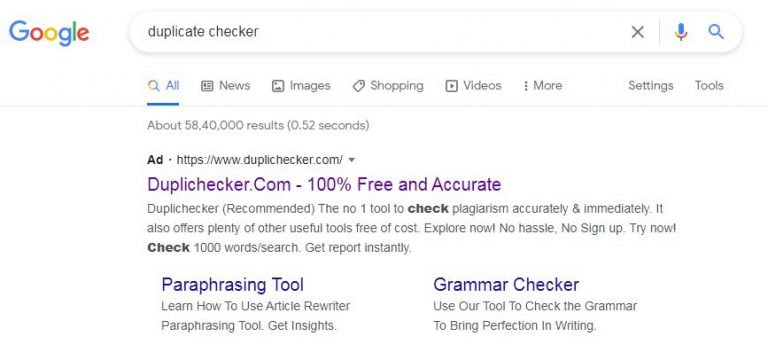
Step 1. Search for Plagiarism Checking software online, Example, Duplicate checker” M
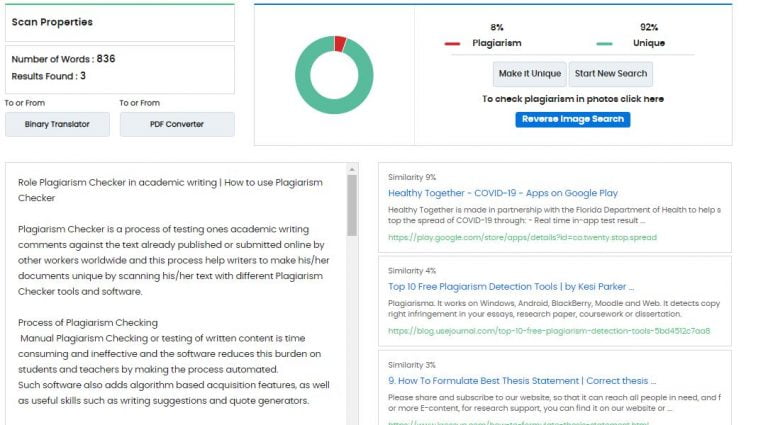
Step 2. Copy and Paste your text into the search box, with a maximum of 1000 words per search Or, Upload your Doc or Text file using the Choose File button or URL
Step 3. After clicking on CAPTCHA scroll below and click on the “Check Plagiarism button and wait for few moments till the result generated by scanning the whole documents
Step 4. See the final result with plagiarized text in RED color and unique text in GREEN. or
you can download a PDF file of that report and see the details, the plagiarized text is display in the REED color.
Note: You can see the word count, character, date of your text checking, and matched sources similarity % in this report.
There are some free Plagiarism Checker software and tools available online for your document analysis for plagiarism or duplicate text and one may find these features in advance mode in paid version of Plagiarism Checker software who need a percentage of cash for subscription and this can be a problem if you are a student or researchers.
Importance of Plagiarism checking in the academic carrier
Plagiarism checking testers help in all aspects of academic carrier and making students respect other people’s work and not steal their ideas.
From a business perspective, these tools help protect your copyright and protect your internal documents.
Another way is to use free Plagiarism checking tools to see a person’s work and to get the result we used a simple copy and paste content from any document or PDF copy of an academic journal
Plagiarism checking by any Plagiarism testing tools and result will be according to their level of accuracy in finding unsupported content.
In spite of that, these tools have some secondary considerations include extra features such as characters or word count limits, supported file formats, reporting features, and background creation Continue reading and grammar checking facilities.
Role of Plagiarism in academic writing or research
In this age of technology, a Plagiarism checker or detector is essential in protecting your written work and benefits all students, teachers, bloggers, text owners, and anyone else in protecting their writing text.
Cheating or plagiarism kills your working life or carrier. Long ago, readers seemed to have no idea if the paper they posted contained copied content. All they knew was that they were already facing a charge of robbery and they do not have access to services.
Today, experts are able to edit and manage similar expressions after scanning their documents with software. Teachers will also find a tool that reduces the burden of retrieving research activities and opening cases for students to steal documents. A real Plagiarism test or Plagiarism checker is considered an important tool for schools, colleges, institutions of higher learning, institutions, and universities.
Plagiarism software is compatible with different operating systems like Windows, Android, BlackBerry, Moodle, and Web and detects copyright violation in your academic writing or Research, newsletters, research papers, studies, or dissertation.
It supports Google, Yahoo, Bing, Scholar, and textbooks and helps prevent cheating, and take few minutes to analyze your document. Looking for an online service that is accurate enough to help you track duplicate content and make things easier for you. Use a plagiarism checker to track all your written content and save yourself from the shame of being accused of stealing by mistake.
While there are some paid features of Plagiarism that are better and allow you to customize, the free subscription to use duplicate content is right for you. You should know that scanning results are not a matter of checking your credibility. It is a functional program designed to help you trace the same sentences and get a free percentage or similarity report.
Level of Plagiarism in academic writing
According to UGC regulation for Plagiarism decided in 530th meeting for the regulation of Promotion of Academic Integrity and rule for Prevention of Plagiarism in Higher Education (HEI) the plagiarism is categorized into different levels on the basis of similarity % in the text during the plagiarism checking and based on the level of similarity penalties were decided for the authors and the document may be rejected.
Plagiarism level
Explanation
0 level
Up to 10% Similarity
No Penalty (come under minor level and in this case no penalty, you documents are accepted
level 1
Above 10 % to 40% Similarity
Penalty- in this case, your document rejected or asked to withdraw the document and resubmit after perfection.
Level 2
Above 40 % to 60% Similarity
Penalty- in this case, shell be asked for withdrawing document or allowed to take time for rectification.
Level 3
Above 60% Similarity
Penalty- in this case, shell be asked for withdrawing document or not allowed to submit.
This is all about the process and step used in plagiarism Checker software and tools and hope these help you in your detecting plagiarized content for your manuscripts before publishing it, KRS is an online learning platform, which brings novel articles from time to time, stay connected.
Please share and register on our website, so that it can reach all people who need help, and find out more about E-content, for research support, you can find it on our website or you can write to us at info@kressup.com for a free consultation.
FAQ Related to Plagiarism Checking
Q 1. What is Plagiarism in academic writing?
Plagiarism means presenting someone else’s work as your own in academic writing and Plagiarism involves the use of words, ideas, or information from a source without inserting the appropriate text.
Q 2. How does a Plagiarism Checker work?
Plagiarism Checker is a software used to identify similarity matches by scanning documents in various databases online base on AI technology and identifies matching text items and compares them with other published work.
Q 3. How can I check Plagiarism online?
Copy and paste the content into the text box provided in any plagiarism checker tools and click on the “Check Plagiarism Button” and it will use your text in its database of millions of sites to show you the best-plagiarized report with detailed results.
Q 4. How much is Plagiarism allowed?
According to the UGC below 10% similarity is allowed and up to 15% is acceptable in research papers and more than 25% similarity is considered to be the highest percentage of Plagiarism and shell be asked to withdrawing the document.
Plagiarism Checker is an online process that helps writers, bloggers, and webmasters for checking copy-paste or cheating by scanning your document with the help of Plagiarism Checker software and compare these files against the text submitted online by you or by other workers in any online sources for the services of others
In this article, I made a list of the top 15 free Plagiarism Checker software that will allow you to detect duplicate content and deal with the nightmare of plagiarism. However, you will often find these features in paid Plagiarism Checker software who need a lot of money for subscription and this can be a problem if you are a student or if you are a teacher and your institute does not register for any Plagiarism software.
List of top 15 free Plagiarism checker software
1.Copyleaks
Copyleaks Plagiarism Checker is the best online cheat detection and detection service, phrase content, and the same text using advanced search software and advanced algorithms based on 100+ languages powered by Artificial Intelligence and machine learning that combines advanced search results from many sources and make sure that the scanned content is real and authentic. Search is a complete cheat test that can scan documents, crude text, URLs, and links to APIs.
2.Duplichecker
Duplichecker is an easy-to-use online browser for Plagiarism Checker online content and is designed for students who want to ensure the integrity of their academic and research work. This free online cheat checking software is very useful for people of any profession and offers a standard text box that allows you to analyze 1,000 text words per search and provide two ways for duplicate text checking by copy and paste your text or paste URL and test for cheating, or upload .tex, .txt, .doc, .docx, .odt, .pdf, .rtf or text file from your computer and check the duplicated text to get some 100% accuracy with mathematical results given each scanned text, giving the user a complete analysis of the text.
3. Edubirdie
Edubirdie Plagiarism Checker not only examines your work to find potential sources but also helps you to identify them so that you can view the results in this tool you need to create for free. The site has a text box where you can paste your essay, website content, resume, or other types of paper. You can also upload files to .pdf, .doc, .docx, .txt, .rtf, or .odt and after looking at your work, in the first steps, the tool gives you a sign of the similarity, telling you how well your text was written in a particular source. It will also show you the marks of the letter A to F and the percentage of your work, grammar, readability, common sense, and redundancy.
4. Grammarly
Grammarly is an automated proofreader and a plagiarism checker tool that will tell you whether your text contains duplicate content or not. It makes sure that everything you write is easy to read, work, and error-free and thus scanning cheating will not only save you time but will also help you avoid writing mistakes. This plagiarism used about 16 billion web pages and ProQuest database to immediately check for hundreds of system errors and explorer attacks your text against over billions of web pages, discovering well-written passages and highlighting before published sections elsewhere. Grammarly Checker is part of a robust typing application that provides advanced feedback on typing tools such as grammar and spelling as well as complex style problems such as word choice, processing, tone, and cheating scanning will not only save you time but also help you avoid typing errors.
5. PaperRater
PaperRater is a free online Plagiarism Checker service that allows authors at any level to check automated quality tests in their work and grammar, offer writing suggestions, and use a free plagiarism check using large search engine indexes based on free artificial Intelligence technology includes Indigenous Language Processing, Mechanical Learning, Data Recovery, Computational Linguistics, and Mining Data to produce the most powerful error analysis tool available on the Internet today to help students write better. Like many free cheat testers, the PaperRater site includes a text box where you can paste the text you want to analyze. But what makes it different is the default settings for your analysis. You can choose the level of education, the speed of cheating discovery, and the type of paper you submit from the download options and it uses its algorithm related to its name and evaluates your work by comparing more than ten billion texts to give you the first points.
6. Plagiarism checker
Plagiarism Checker is a 100% free Plagiarism Checker tool to detect plagiarism or cheat by step by step Check plagiarism in simple text and URLs etc. You need to copy and paste or type one or more phrases from different parts of the document in the box below and hit the enter key after each phrase and get a plagiarism report. The goal of this tool is to empower writers with a sense of security in their work.
It allows users to search for several phrases on a student’s paper simultaneously without having to type quotation marks or special operators, much needed by search engines if you are trying to find direct copies of a student’s test this tool adds citation marks and your special operators. It is free and works on any paper, whether readers send you an email or give you hard copies.
It is a free online Plagiarism Checker tool that helps people from all walks of life. Our cheating software was designed by a team of dedicated and skilled developers who use the best techniques and techniques to ensure 100% accurate results by separating each sentence with the help of real data sources. We aim to provide you with a sophisticated tag and complex service designed for concrete reasons and provides a standard text box that allows you to analyze 1,000 text words per search and provide two ways to test duplicate text by copying and pasting your text or pasting URL and double-checking text for 100% accuracy and provide the user mathematical results given for each scanned text, character, words and sentences text.
8. Plagiarisma
Plagiarisma is one of the same, popular paid services like Copyscape and Turnitin, and with its widespread use, scholars have suggested the use of a 1: 1 comparison method of Plagiarism Checker, Plagiarisma is already used in its system. The basic tool helps you to evaluate your work when comparing duplicate sentences online and the site looks up to date, a simple copy test and paste specific content from an academic magazine produced a unique 0% result. This makes him one of the biggest cheats detector online tool and they happen to be free. Instead of using a text box, you can reload the file on the site. You can check your activity by comparing it with a specific URL. Supported file types include TXT, HTML, RTF, and more. The online tool supports search for over 190 languages and is also possible to search for content using Google Scholar and Google Books.
9. Plagiarismhunt
PlagiarismHunt is the best way for Plagiarism Checkers who want to verify their content in every plagiarism tool available on Google. It is a comprehensive search and easy-to-use online plagiarism checker that explores 5 different cheating systems such as Copyscape, Unicheck, etc with a single click and sees which one will show the best results. It’s completely free to use and you can download your paper and the tester will show you the percentage of cheat for free no need for any registration or passwords, etc. The system records all data uploaded and will be deleted within 24 hours.
10. Plagium
Plagium is an easy-to-use Plagiarism Checker tool that lets you find text and URL content. It does this by separating the text into captions and comparing them with online sources and this method gives users a cleaner, fewer search results compared to other search engines. As is often the case with free online plagiarism testers, the Plagium website includes a text box where you can enter the largest of 1,000 characters in the text box. It gives you the option to perform Quick Search or Advanced Search, but only the Quick Search option can be used without creating an account. Quick Search shows you links to software that is available online. However, its shortcomings are in that it does not give you a comparison that matches your work with the same result. Yet, the accuracy of its cheat search results makes it one of the free cheat testers available online.
11. PlagScan
PlagScan is a free Plagiarism Checker tool for both individuals and businesses examining texts by comparing online content, scientific journals, and user texts. No user registration is required and you can simply upload the document from your computer, by attaching it directly to the appropriate field, uploading a file from the web by uploading its URL to a specified location, or uploading it from cloud storage such as Dropbox, Google Drive, or OneDrive, After you analyze your document, our cheat tester will calculate the percentage of duplicate content and generate comprehensive reports.
12. PlagTracker
PlagTracker is a quick Plagiarism Checker tool that searches both websites and academic databases by copying and pasting text, or uploading a file and being notified which parts should be quoted and the list of sources to use. PlagTracker online tool guarantees to students, teachers, publishers, and site owners that whatever you type can be screened by our online Plagiarism software to confirm that your document is unique and you can view your content results in English, French, Spanish, German, Romanian and Italian.
13. Quetext
Quetext is one of the free Plagiarism Checker tools you can use in your research. It is a cheat and copy check tool and is completely free and no account, registration, or download is required. The user can only copy and paste the text to the selected location and has a fast free search feature that helps you update your work at a quick speed and similarly it finds synonyms for rewritten phrases with incomprehensible comparisons. Quetext has a free program that allows you to receive five free checks every month and most searches require you to sign up for free. First-time users can get 500 free word analyses, at the moment, conditional scoring gives weight to each match found in your work in addition to the full value of DeepSearch and this DeepSearch patent technology provides you with content analysis, unconventional similarities, and conditional scoring. With this, Quetext was able to get 100% of the copied and pasted content from the educational magazine.
This is a free online Plagiarism Checker tool that does not must any registration. There are various text input options, you can upload a document in .tex, .txt, .doc, .docx, .odt, .pdf, .rtf format or select Dropbox or copy and paste the text into the text box below, then click Check Plagiarism Button and then watch as your article is scanned for duplicate content. When the test is done, you will be given a direct percentage that tells you how original or unique your article is. Phrases or sentences in red are already online and will not pass Google tests.
15. Viper
Viper is an online Plagiarism Checker app that works with any standard web browser and advanced online cheat tester, which uses its own powerful feature, which can help students, teachers, schools, colleges, universities, and professionals check their papers for copying and content which is a repetition. Viper has become a preferred application for students and institutions looking for a cost-effective solution to ensure that their presented work is not copied. With an easy-to-use interface and a very detailed scanning process, it only takes three easy steps for a Viper to update your cheat document and generate a full report.
Submit the selected document using the Viper online application and submit it for testing if it has been copied by 10 billion sources. Viper magically scans for essays, journals, and many other online sources. You get a clear and concise plagiarism report, which shows exactly how your document is similar to other existing content.
This is all about this article and hopes these free online Plagiarism Checker software and tools help you in your research and you can detect any plagiarized content for your documents before publishing it, KRS is an online learning platform, which brings novel articles from time to time, stay connected.
Please share and subscribe to our website, so that it can reach all people in need, and for more E-content, for research support, you can find it on our website or you can also write us at info@kressup.com for a free consultation.
FAQ Related to Plagiarism Checker
Q 1. What do you mean by Plagiarism Checker?
Plagiarism Checker is the process of locating the orders of plagiarism with the helps software or tool and you can check the % copy-paste text by matching it in online repositories
Q 2. How do I check my plagiarized work?
One can check his /her plagiarized work using plagiarism checker software and there are both paid and free software are available online. You can check your work by simply upload a document into the text box given or copy-paste, then click the Check Plagiarism Button and then watch as your article is scanned for duplicate content
Q 3. What is the best free plagiarism checker?
A plagiarism checker which proved 100% accuracy in checking text and provides the user mathematical results given for each scanned text, character, words and sentence text is called the best plagiarism checker. I can recommend Duplichecker, Plagiarism Detector, Plagiarism checker, Grammarly, and Small SEO tools are some best free plagiarism checkers online
Data analysis is the process of applying systematic statistical or logical techniques to describe, illustrate, recap, and test the data. It excludes the purification analysis process that transforms and presents useful information to conclusions and supports research findings.
Generally, there are four types of data analysis processes used by the researcher from the entire data collection phase to the final observation in the research study theses Descriptive Analysis, Diagnostic Analysis. Predictive Analysis and prescriptive Analysis.
What is a Statistical analysis of data?
Statistical analysis is the response to the research question “What happened” and these analyses cover the range of processes carried out by researchers from data collection to analysis, modeling, interpretation, and data presentation using a different tool. Statistical analysis is subdivided into two types of analysis.
The first is the descriptive analysis which works with complete or summarized data numbers and indicates whether it is possible to perform an incomprehensible operation on that data using frequency and percentage.
Second is the inferential analysis works with sample resulting from the complete data and find different conclusions from the same data set by choosing different sampling processes.
Methods of data analysis
There are different methods of data analysis depending upon the type of research carried out and some common methods are as follow:
1. Descriptive Analysis
It is the process of transformation of raw data in a systematic way that will be easy to understand and presented in an organized way to generate the descriptive result. It provides basic information about variables in a dataset and highlights the potential relationship between variables in graphic and pictorial form.
For Example: Investigate the reason behind a problem and its positive and negative impact on the data collected during a particular period of time and compared it with others.
The diagnostic analysis is a reliable condition that uses analytical technologies and tools for the interpretation of data that is considered to discover and found out what happened or root cause analysis of a specific problem.
For Example: Investigate the reason behind a problem and its positive and negative impact on the data collected during a particular period and compared it with others.
3. Predictive Analysis
Predictive analytics is a branch of advanced analytics that is used to make predictions about unknown future events by using current data or historical data with the help of statistics, modeling, mechanical leasing, and artificial intelligence (AI).
It is used to reduce risk, improve actions against the act, use fraud detection, improving marketing plans by promoting sales and buying.
For example, All airline companies used a predictive data model to set the tick prices from time to time.
4. Prescriptive Analysis
In this type of analysis, the main focus is to find out the best course of action for any pre-specified outcome based on different choices of action and provide a summary of data. In this action analysis, you are free to determine whether need to, then it is time for discovery. The prescriptive analysis is related to both descriptive and predictive analysis but emphasizes action instead of data monitoring
For example, Google’s self-driving car and Waymo’s self-driving taxi services are examples of prescriptive analysis
5. Text Analysis
Text Analysis is a technique to analyze unstructured data and parsing texts to extract machine-readable data from that text. The purpose of this analysis is to produce guaranteed structured data with free content text.
In this press slicing and dicing heaps of undeveloped, heterogeneous documents into readable text for its meaning in the assumption, subtext, and symbolism or any other value it reveals. It is also called data mining, text analysis, and information withdrawal process.
For example, A product reviser text from the retailer website written in review comments by the customer in sentimental word or analysis any document can help a business understand what customer like or dislike about your product.
6.Inferential analysis
It is used to produce the results used from a random / probability sample back to the population from which the sample was collected. This analysis is only required if a sample is collected by the random procedure of sampling and the response range is very high. With Inferential statistics, and analysis one can generate data and generalize about a population.
For example, You might visit an institute and take a group of 150 students and ask them questions about online learning versus classroom learning and call answers by yes and no, use Inferential analysis and calculate the range, and percentage of the population like online and off learning.
Importance of data analysis in research
Data analysis is an easy way to check those students about their research matter and gives the reader an insight into what updates have been received throughout the entire data and interpretation.
Data analysis help you to understand your customers, allowing you to change your customer service and support according to their need and built a strong relationship with them
Data analysis helps you reduce big datasets by the implementation of new tools and technologies, currently, sellers trust a large number of data to provide their value to research and explore information through data mining
Data analysis also enables the credibility of rediscovery data or new research and provides back to them with reliable references to stand on a theoretical base.
Data analysis comes up with understanding and interpretation in the form of data analysis without any hum bias and the reader gets a clear and straightforward picture.
Data analysis also supports you to update your processes and technique, save money and boost your baseline study.
This is all about data analysis and different methods of data processing and hopes these bases and information help you in your search and carrier, KRS is an online learning platform, which brings novel articles from time to time, and stays connected.
Please share and subscribe to our website, so that it can reach all people in need, and for more E-content, or research support, you can find it on our website or you can also write us at info@kressup.com for a free consultation.
If you find this article useful, don’t forget to share it!
The process of data analysis typically goes through five iterative phases: identifying the data to be analyzed, collecting the data, cleaning the data in preparation for analysis, analyzing the data, and interpreting the results of the analysis.
Q 2. What are the most important aspects of data analysis
The most important aspect of statistical data analysis is not how to process the data, but what data to use.
Q 3. What is an example of data analysis
A simple example of data analysis is when we make decisions in our daily lives by thinking about what happened last time, or what happens when we make that particular decision.
Q 4. What is the importance of data analysis
Data analysis is important in research because it makes studying data much easier and more accurate and helps researchers interpret the data easily, so they don’t miss anything that might help them derive insights from the data.
When submitting your research paper to a reputable journal, you might see the word “reviewers” and be asked to list the names of at least 3 reviewers at the time of online submisison of paper.
It is vital to submit reviewer name with your manuscript in all reputable Journals, if you are not published any papers.
We’re here to help you to find new reviewer in your research field before you submit your application.
During the process of paper publication finding noble reviewers or referees for all fields of research is one of the most challenging tasks and time-consuming processes for the editorial board of a suitable journal.
The rapid growth of the posting of articles means that editors are sending more invitations to referees than ever before and as a result, the rate of acceptance of invitations for the review of that journal has dropped dramatically.
Many publishers will ask you for a minimum of 3 reviewers for your paper at the time of paper submission. It is unlikely when they do not find any expert on the subject of your paper. Then they will send your paper for review to your nominated referees. Otherwise, they will keep the details of the referees confidential and they may be entitled to send some of their research papers for review to your suggested referees in future.
You need to find reviewers with expertise in the subject and appropriate technology to check the content of the article, and they need to be willing to complete the review process until the deadline set by the publisher. This can impact the process of publication and limit the author’s editing process.
The practice of suggesting referees by the author for their research work is controversial, but a peer review is a principal part of the academic research publishing process, and usually, qualified and professionals referees can check the content of submitted articles to their quality and similarities in accord to journals guidelines.
The identity of the referees can be identified or disclosed under the journal publication policies.
How can we find people to review our research papers?
Look at the references cited in your article.
The reference section of a research article is a good place to start when looking for a reviewer. Here you will find the names of some of the most respected researchers working in the field and the author of that article.
It is worth remembering that the identified researchers may be particularly qualified if their article is a comprehensive review of that research area. But beware of conflicts of interest, as authors are likely to cite colleagues or participants.
Use the editing board of a journal.
The editorial board of that particular journal is a great source for both updates and recommended reviewers and all members of the editorial board participating in this peer review process and will help you improve the effectiveness of article review and expand your review process. These board members can review articles based on their subject expertise and you can even make journal reviews one of the conditions for board membership.
Find earlier writers and guest editors of the journal.
Your selected journal for publication is also an outstanding source for possible reviewers for your submitted research paper.
You can also suggest the authors of before-published articles and guest editors of the journal and may exactly find what you need in a reviewer. So don’t forget to search the archives for journals and select the topic of your research and find the detail of the previous author for your review.
Use previous referees.
You can find the previous reviewers in your database. These are the noticeable people to go to when you need any help, and you can find your best reviewers using the review tools in any database for reviewers, i.e., ScholarOne or in the Planning Manager.
Note: Make sure you do not ask the same people over and over again, something that can easily happen, and reviewer tiredness can prompt a before engaged reviewer to close your requests.
Use your own research network.
Your network will include researchers, academicians, and authors from the relevant areas of research, who can make excellent reviewers. These are people who you are working with now; former partners; people you have met at educational conferences or industry events; older colleagues or mentors; etc.
An added bonus of your personal network reviewer is that these people in it may be more open to the way and have a chance to suggest alternatives if they can’t help themselves.
Use primary job researchers or younger colleagues.
Older researchers in their field need to build their knowledge by reviewing articles, and they are less likely to fill out applications, so they are more likely to be able to help you in your review process.
But, it is important to remember that they may need formal training especially if this is the first time they have done peer review.
Use search tools and databases to find researchers working on similar topics.
There are many search tools and database resources you can use to find referees in your area of research. The electronic peer review system of an online tool helps you to find the appropriate review.
When an author submits an article, the referees’ locator searches for reviewers based on keywords and abstract keywords. You can set your search preferences on ScholarOne to make sure the search gives you the information you need to properly select reviewers.
This tool allows you to search for researchers or reviewers based on keywords, and it works through millions of articles and articles on PubMed to find the most suitable authors to match your search.
This powerful tool allows you to view authors depending on the publication number by topic, helping you to find potential reviewers with relevant knowledge of the article you are working on.
Concluiosn
After finding the appropriate reviewer for your research paper in any of the above-mentioned ways of search, you need to assign his/her name to the editorial office of the selected journal.
You can collect the name, email, and address of that particular expert or reviewer and email all these details to the chief editor of the journal, for example, a suggested review.
Note: Some journals used an online paper submission gateway and in this case, you need to add your potential reviewer’s detail in that portal at that time of submission.
This is all about this article and I hope this suggestion for reviewer finding and the database used in search helps you in your reviewer finding task at the time of research paper submission in a suitable research journal, KRS is an online learning platform, which brings novel articles from time to time. Stay connected.
Please share and subscribe to our website, so that it can reach all people in need, and for more e-content and research support, you can find it on our website, or you can also write to us at info@kressup.com for a free consultation.
If you find this article usfull, don’t forget to share!
A research database is the collection and organization of different online sources such as scientific journals, books, research articles, papers, and other media used to retrieve information.
These research databases or search information deliberately help students, academics, and researchers to access the information they need during their research carrier and favored to use without having to sign up or pay for an expensive service.
All the references, info, and archives in these database lists can be used for free or sometimes you need free registration first. We focus to search and provide you the services that include free access catalog, open access journals, and many listed sites that offer at least some resources and the highlighted items.
Best Online Academic Research Database
The best online academic research database and information enlisted below are organized by instruction for ease to use and you can search your field in the database that should be linked directly to that category.
arXiv e-Print Archive Research database
The arXiv is a free e-print database service run by Cornell University Library and now offers open access to more than 1.8 million scholarly articles from well-known resources in the field of physic, electrical engineering, mathematics, computer science, quantitative biology, systematic science, quantitative finance, and economic.
BioMed Central Research Database
BioMed Central is the UK-based not profitable scientific open access publisher and offers open access research from more than 290 peer-reviewed journals in the fields of biology, medicine, and health. You can browse these journals by topic or by subject, or you can search all articles by your required keyword.
CORE Research Database
The CORE is the world’s largest collection of open access research journals and is a multidisciplinary aggregator for open access research and allows users to search for more than 66 million open access articles collected from more than 11 thousand data providers worldwide.
While most of these link to the full text located in the original publisher area, five million records are held directly in CORE and offer an advance search option in spite of keyword search, to filter the result of research by type, languages, year, type of journal, source ad author.
Digital Library of the Commons Repository Research Database
The Digital Library of the Commons (DLC) repository is internally and a multimedia library that allows users to browse thousands of free access and open full-text articles, papers, and dissertations from around the world and is governed by Indiana University. You can browse by type of document type, date, author, title, and more or search for keywords related to your topic.
Directory of Open Access Journals Research Database
The Directory of Open Access Journals (DOAJ) was launched in the year 2003 and the database is to grow the visibility of professional access journals. It works indecently and gives researchers access to more than 15000 high-quality, peer-reviewed and open access journals covering all areas of science, technology, medicine, social sciences, arts, and humanities. It has archived more than two million articles from 10 thousand journals which allows you to browse by topic or search by keyword.
Dryad Research Database
The Dryad is the ultimate digital library of selected, open scientific research that makes research data easily accessible to you. It is run by a non-profit membership organization that aims to “promote a world in which research data is readily available, integrated with expert literature, and reused to create information.
” It’s free to access, but be aware that there is a related publishing fee if you wish to publish your research data in Dryad.
Education Resources Information Center Research Database
The Education Resources Information Center (ERIC), is an online library and supported by the Institution of Education Sciences. ERIC provides free public access to public research and educational services in any topics related to the field for an educator, researchers, and the general public.
ERIC has a large set of more than 1.5 million database records of journal articles and other educational materials where you may need to purchase information, but you can only search for text-filled articles. This service mainly identifies journals, literature, and books.
Google Scholar Research Database
Google Scholar is a search engine dedicated to academic work and the best research database for looking for a scientific paper and you can download that paper freely.
Google Scholar offers an easy way to extensively search for scholarly articles and from one location, you can search for a wide range of fields and resources like essays, suggestions, books, summaries, and court opinions, from academic publishers, technical communities, online repositories, universities, and other websites.
Google Scholar helps you find worldwide academic research and provide an easy way for writers to showcase their academic publications. Your articles, graph quotes over time and calculates author multiple quote metrics to appear in Google Scholar
JURN Research Database
The JURN is a free online tool for finding and downloading research articles. It is a multidisciplinary search engine and provides you links to various academic websites, articles, and journals all for free or open access specifically covering the arts, humanities, business, legal, environmental, scientific, and medical fields.
JURN has identified nearly 5,000 indexes to help you find exactly what you are looking for.
Open DOAR Research Database
The open DOAR, or Directory of Open Access Repositories, is a complete source for open access journals and articles and is maintained by the University of Nottingham and does not provide any metadata but you can assess by using Google Custom Search. The DOAR uses open access boxes around the world and retrieves relevant research in all fields.
Public Library of Science Research Database
The Public Library of Science (PLOS) is a non-profitable and largest player in the world of open access in fields of science, technology, and medicines and was founded in 2001 to provide a library of open access journals dedicated to helping open up educational research.
According to the site, “all PLOS content is at the highest level of open access, meaning that scientific articles are readily available and freely available to anyone, anywhere.”
PubMed Research Database
The PubMed is a free database of the National Library of Medicine National Center for Biotechnology Information supporting the search in biomedical and life sciences. PubMed database is a well-known research platform in the field of science and medicine which provides more than 32 million citations and abstracts for biomedical texts from MEDLINE, health science journals, and online publications.” Although most resources are post-paid, you can filter your search to view only the full text, making this a very useful resource.
ScienceOpen Research Database
The ScienceOpen is a freely available and publishing network, provides open access to over 28 million articles in all fields of science. The advanced search function with a smart filter in ScienceOpen provides many details, allowing you to find exactly the research you are looking for although you need to subscribe to view the full text of the articles, registration is free.
ScienceOpen was founded with the aim of “creating open and public communication between academics and allowing ideas to be judged on their own merits, regardless of their background.”
Semantic Scholar Research Database
The Semantic Scholar is a unique and easy-to-use tool, which helps to locate and understand the right research, make important connections, etc. Semantic Scholar uses the power of artificial intelligence to fine-tune millions of science-related papers according to your search terms and you can search 192 million research papers in all fields of science.
According to the site, even though some articles are post-paid, so you can expect to get full-text results. Another feature is advanced search options, which allow you to search by cell type and brain region, among other things.
Social Science Research Network Research Database
The Social Science Research Network (SSRN) was founded in 1994 and in 2016 Elsevier bought SSRN from Social Science Electronic Publication Inc.
The SSRN is the biggest open access online research database or collection of papers from the field of social sciences and humanities community and others it provides more than 700,000 abstracts and more than 600,000 research papers under the discipline of social sciences, humanities, engineering science, life science, applied science health, and physical sciences.
SSRN has no particular option to search for full articles, but because most of the pages on this site have free access and you must be a subscriber, but registration is free and allows you to connect with other professionals around the world.
Worldwide Science Research Database
The Worldwide Science is a global research database search engine and proved access to speed up the national and international scientific data and processes from different sources by providing a one-stop searching database.
Worldwide science tools proved real-time searing and automatic language translation features help users to search results in their preferred language in multilingual scientific literate.
This is all about this article and hopes these free online database sources and information help you in your literature search and research journal discovery before publishing in a suitable research journal, KRS is an online learning platform, which brings novel articles from time to time, stay connected.
Please share and subscribe to our website, so that it can reach all people in need, and for more E-content, for research support, you can find it on our website or you can also write us at info@kressup.com for a free consultation.
If you find this article useful, don’t forget to share it!
If you have recently joined a research and plan to publish a research paper, Choosing who is the first author, and whose is the last and corresponding author, is a challenge for you.
We are available to help you, author Order In A Research Paper
We usually set the author order by the names of the authors in the research paper in such a way that the level of contribution and other less significant contributions are evident in the research work, i.e., the first author to the most and the least to the last.
But, this is not a strict rule. In some cases, it is more difficult to determine which author has given more support than another.
However, some journals ask to mention the work done by each author in the heading (author contribution) to understand the contribution made by each worker to a particular paper.
The order author naming in research and academic contribution will use in the mark allocation process for each author during academic performance indicator (API) and other academic evaluations.
For example, 0.5 weight for the first writer, 0.4 for the second author, and so on. However, I do not believe there is a common framework for this.
Arrangement of the author in a research paper
Generally, in the organization of authors’ names on a research paper, after the first author, writers are often listed as co-authors according to their role in the work, from most to least.
In most research papers always write the author’s surname name before listing his or her initials.
You only need to provide the initials of the first and middle name given by the source and put a comma after each last name and between the names of different authors.
If more than one author has contributed equally, you can ask the journal editor to show this in the publication.
Types of the author in research paper or author order
First author
The first author should be the person who has contributed most to the research work, including the writing.
The order of the authors should be determined by the total contributions to that research paper, but it is a common practice that senior author to appear at the end, sometimes no matter how much he/she contributes.
Tips: Some time it has been noticed that your Ph.D. supervisor demand to become the first author of your research paper and it’s a fallacy.
Second author
The second author is a second main character of your paper, who contributes most in experimental work and writing, proofreading of manuscripts, but less than that of the first author and more than every third, fourth and rest authors. Author considerations usually cover all your contributions to that project.
Principal/Corresponding author
This author recognition is a common question among all scholars and often seen at the beginning of the researcher’s career, but it is easy to explain. Mainly, the corresponding author or co-author is the person who has made a significant contribution in research and shares responsibility and accountability for the research results.
He/she also leads the text delivery process from paper submission, review, galley proof, and till final publication and the other author is actually the researcher who wrote and format the manuscript.
The corresponding author is usually a senior researcher or scholar, such as a senior professor or chief researcher (PI), with extensive publishing experience and experience.
For this reason, they are often promoted or decided by other writers in the group. The corresponding author takes all the primary duties of communicating with the journal editorial board during the text submission, peer review, and publishing process.
Third or more authors
In some cases, the third writer of the research paper may be the last author and usually a supervisor or PI of your research work, and they seek special value in some fields of study.
A third author is a person who has to get research grants from any funding agency and under whose supervision the project has seen completed.
Last author of the paper
The last author is usually a team leader or PI who may have provided important input in the research work, framed your research, and supervised the research work, but he may not have actively done any experiments or written this paper.
The final author is frequently the corresponding author.
Ghost author
Ghost author is the author who has made a supportable contribution in research, data analysis, and or handwriting but is not named or disclosed on the author’s line or in acknowledgment.
Authors’ weight in a research paper
Speaking of analysis, I have noticed that selection committees can follow their own mark allocation process for each author.
But according to the latest UGC guidelines and API Score for shared publishing, there is 70% of the total value of the publication is for the first / corresponding/guide/mentor or and the remaining 30% point for other authors.
If the first author or corresponding author is the same person, the recipient must be given 70% of the total point of that paper and if you are a single author you get 100% or full point, but in two authors 70% of the total value for each author.
Each published research paper counts the author’s index, which is the measure of your CV and is used in our academic promotion and carries.
Credit in your CV is checked, the number of papers, the impact of the Journal, and the quotes on the papers are regarded.
This is all about this article and I hope it helps you in your research paper framing. This is all for today. Thank you for attention. Subscribe to KRS for my Blog for a new article that KRS posts from time to time. Comments in the comments section below if you like this article.
If you find this article useful, don’t forget to share it!